
How to Use Claude Fable 5.2 Free ($5 Daily Credits, No Card Needed)

How to Use Claude Fable 5.2 Free ($5 Daily Credits, No Card Needed)

Anthropic’s Claude Fable 5.2 (claude-fable-5-2) is one of the strongest frontier AI models available for complex coding, deep research, and autonomous agent workflows. Normally, calling this model directly through standard cloud providers costs $8 per million input tokens and $40 per million output tokens.

However, if you are building prototypes, testing agents, or running personal coding workflows, you don’t have to pay out of pocket. You can access Claude Fable 5.2 for free through Coarena by Coasty – a Y Combinator-backed AI evaluation platform that gives developers $5.00 in free daily API usage with no credit card required.

Below is a quick, transparent guide on how to claim your free API key and start making calls in under two minutes.
Table Of Contents
    Add a header to begin generating the table of contents
    Anthropic Claude Fable 5.2 - Free Claude API No Credit Card

    What You Get With Coarena’s Free AI Model API

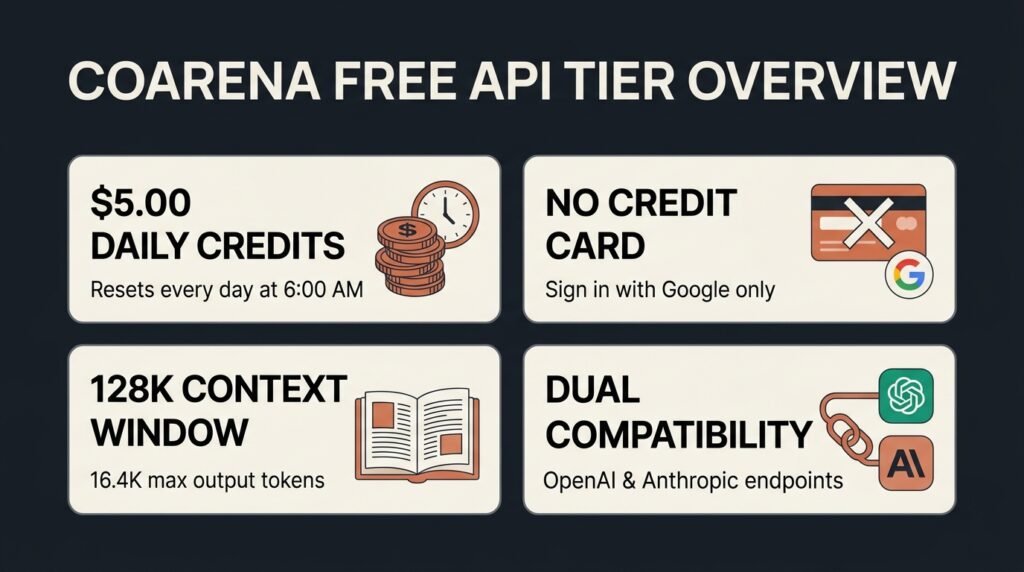
    Before jumping into the setup, it helps to know exactly what is included in the free tier:
    • $5.00 Free Usage Every Day: Your balance resets daily at 6:00 AM, giving you steady credits for testing and development.
    • No Credit Card Required: You only need a Google account to sign in and generate an API key.
    • Full Model Access: Along with claude-fable-5-2 (128K context window, 16.4K max output, image support), a single key lets you call other top models like Claude Opus 5.5, Gemini 4 Carbon, Grok 4.7, and Kimi K3.1 Pro.
    • Drop-In Compatibility: Coarena supports both OpenAI-compatible (https://coarena.ai/api/v1) and Anthropic-compatible (https://coarena.ai/api) endpoints, making it easy to plug into Claude Code, Codex, LangChain, or custom scripts.
    • Built-In Limit Increases: If you hit your $5 daily cap after your first call, Coarena actually lets you request a free bump (up to $10/day) directly from your dashboard or via API.
    Important Privacy Note: Because Coarena is an evaluation arena, the key creation prompt clearly states: “Calls models, runs battles, makes them public. Prompts and replies are kept for good.” Avoid sending confidential client data, private keys, or sensitive personal information through this free endpoint.
    Claude Fable 5.2 Free - Coarena AI Free API

    Step-by-Step: How to Get Your Claude Fable 5.2 Free API Key

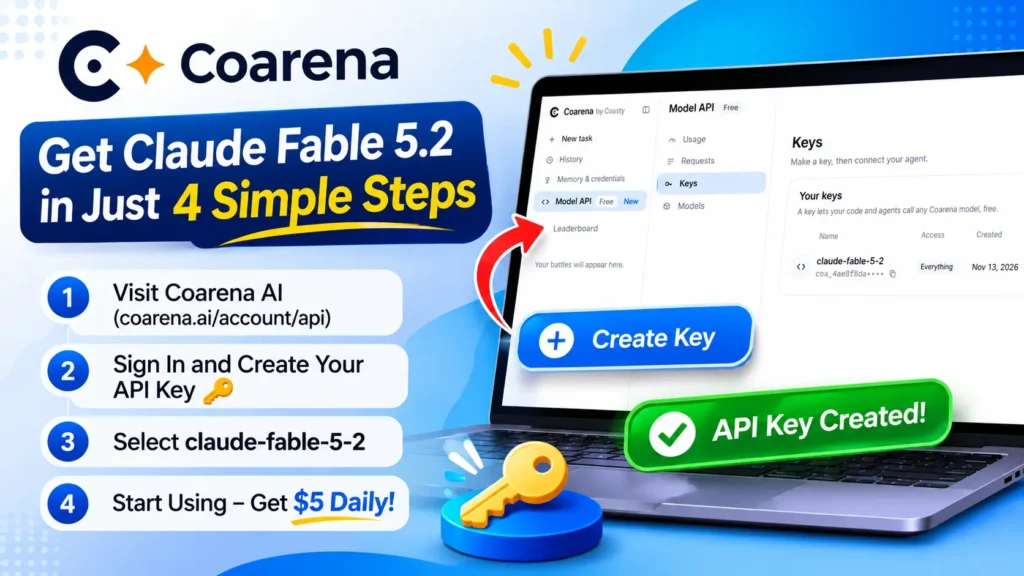
    Step 1: Go to the Coarena API Dashboard
    Head over to the Coarena Model API Portal and click Sign in (or Get a free key) using your Google account.
    Step 2: Create Your API Key
      1. Once logged in, look at the left-hand sidebar under Model API and click Keys.
      2. Click the blue Create key (or Create your first key) button.
      3. Give your key a recognizable name (for example, claude-fable-5-2), review the terms, and click Agree and create key.
      4. Copy your generated key (coa_...) right away and store it somewhere safe.

    Step 3: Connect Your App or Terminal
    You can use your new key with almost any AI coding assistant or SDK.
    For Claude Code / Anthropic SDK:
    Run these commands in your terminal, replacing the placeholder with your full API key: [1]
    bash
    export ANTHROPIC_BASE_URL=https://coarena.ai/api
    export ANTHROPIC_AUTH_TOKEN=your_coarena_api_key_here

    For OpenAI SDK / Codex / Custom Apps:
    Use the OpenAI-compatible base URL and set the model ID to claude-fable-5-2:
    • Base URL: https://coarena.ai/api/v1
    • Model ID: claude-fable-5-2

    Step 4: Manage Your Daily Credits
    Your $5.00 credit balance automatically refreshes every day at 6:00 AM. If you need more capacity for a legitimate project, make at least one API call and click the Ask for more option on your Usage dashboard (or send a POST request to /api/v1/limits/requests) rather than creating multiple throwaway accounts, which can trigger rate limits or account restrictions.

    Final Thoughts

    For developers, students, and indie builders, Coarena’s Model API is one of the easiest ways to test Claude Fable 5.2 on real tasks without worrying about surprise cloud bills. Just remember to keep your prompts free of sensitive data, plug in the claude-fable-5-2 model ID, and start building.

    Share This Post:

    Subscribe to Our Newsletter

    Get Our Exclusive Tutorials, Recommendations and more for FREE!

    Leave a Comment

    Your email address will not be published. Required fields are marked *

    Scroll to Top